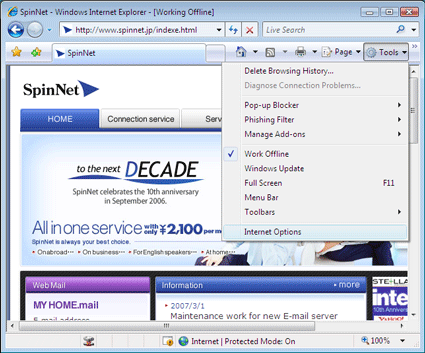
Lunch Internet Explorer7. Click "Tools" from the menu bar, and then click "Internet Options".
2.
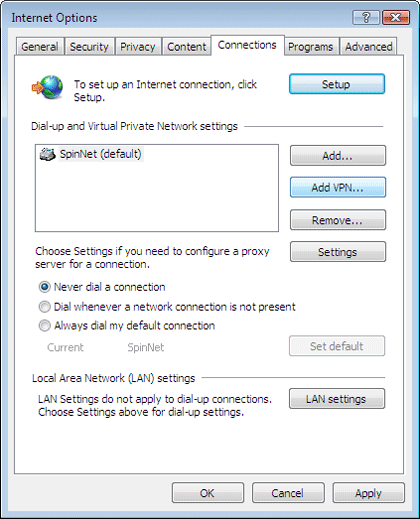
Click on "Connections" tab. Click "Settings" button for dial-up connection, click "LAN Settings" button for broadband connection.
3.
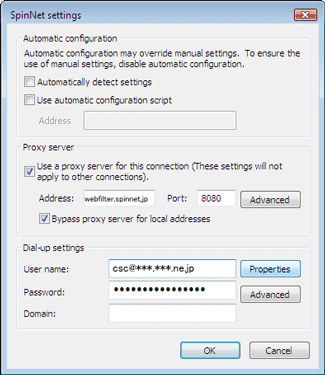
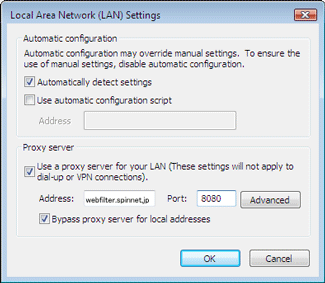
Change proxy server settings as follows, and then click "OK" button.
[ Dial-up connection ]
Use a proxy server for this connection [These settings will not apply to order connections].:
Checked
Address:
webfilter.spinnet.jp
Port:
8080
Bypass proxy server for local addresses:
Checked
[ Broadband connection ]
Use a proxy server for your LAN [These settings will not apply to dial-up or VPN connections].:
Checked
Address:
webfilter.spinnet.jp
Port:
8080
Bypass proxy server for local addresses:
Checked
4.
Go back to Internet Options window, and then click "OK" button.
5.
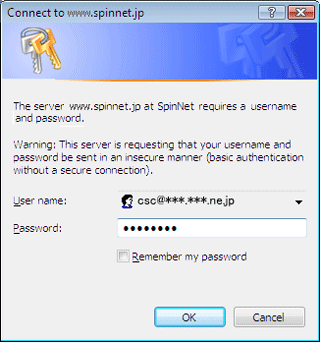
After finished the settings, access to SpinNet site(http://www.spinnet.jp/indexe.html)or other sites, then the authentication window will open. Enter as follows, then click "OK" button.
This anthentication window will open every time you lunch Internet Explorer7. You can save time by checking "Remember my password".