We will terminate "SpinNet BB Mobile Point Service" on September 30, 2022. Click here for details.
What is BB Mobile Point?
BB Mobile Point is a wireless LAN service provided by SoftBank that offers high-speed Internet access. It is available in McDonald's, major train stations of JR East Japan, hotels, Narita International Airport and other urban areas.
SpinNet customers can access high-speed Internet services via the wireless LAN at no additional charge. To use this service, they must have a PC equipped with a wireless LAN function as described below. Due to this service integration, the SSID and WEP Key to access "Yahoo! BB Mobile" has become invalid.
* SpinNet login ID * SpinNet login Password * WEP Key for SpinNet customers * SSID ( ESSID )
BB Mobile Point is available in
places where the marks above are posted.
Details of the service
Service Area
SpinNet customers can access the service wherever BB Mobile Point stickers are posted, such as McDonald's, hotels nationwide, major stations of JR East Japan and Narita International Airport. For details, please refer to BB Mobile Poine area (written in Japanese only).
Fee
Free
How to use
Prepare a PC equipped with a wireless LAN function. The wireless LAN standard of IEEE802.11a/b/g/n is supported. SpinNet customers can access the Internet by using their regular SpinNet login ID and password within the BB Mobile Point service area.
1.
Set up your BB Mobile Point WEP key and SSID into the wireless LAN access settings of you PC. * The setting method differs depending on a PC and wireless LAN card you are using. Refer to the user manual for each device.
2.
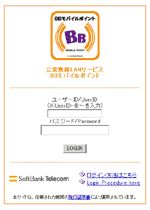
When your web browser is activated, the appropriate screen is automatically displayed. Append @spinnet.jp to the end of your SpinNet access login ID (PAP-ID) in the user ID field.
For example, if your connect login name is 12345678@tka.jpn, input 12345678@tka.jpn@spinnet.jp.
3.
Click the LOGIN button and input your connect login password in the password field. Your Internet connection will open.
Contact
SpinNet Customer Support Center
Working Hours :
10:00 - 17:00 (Except New Year holidays)
Telephone :
0088-210-209 (Toll Free) *Please contact the following number when you cannot use the toll free number. 044-388-0607 (Toll)